


















































If your organization stores, processes, or transmits payment card data, PCI DSS compliance is not optional. It is a business responsibility that protects customers, reduces fraud risk, and supports trust with banks, payment brands, and business partners.
The PCI DSS compliance audit can appear complex because it covers technology, people, processes, physical security, monitoring, and third-party relationships. However, the standard becomes easier to manage when you understand its 12 requirements in plain language.
This guide explains the requirements under PCI DSS v4.0.1, common audit mistakes, and a practical IT security audit checklist to help your organization prepare.
PCI DSS is a security standard, not a one-time certificate. Compliance must be maintained continuously.
Who needs to follow PCI DSS?
PCI DSS applies to organizations that:
- Store cardholder data
- Process payment card transactions
- Transmit payment card data
- Provide services that can affect the security of a cardholder data environment
This includes merchants, payment processors, acquirers, issuers, service providers, hosting providers, and technology partners.
Your validation method may involve a Qualified Security Assessor (QSA), a Report on Compliance (ROC), a Self-Assessment Questionnaire (SAQ), an Attestation of Compliance (AOC), and external vulnerability scans. The exact process depends on your transaction volume, business model, acquiring bank, and card-brand requirements.
Read the official PCI DSS resources and document library before beginning your assessment.
The 12 PCI DSS requirements explained
1. Install and maintain network security controls
Your network must be protected from unauthorized access. This includes firewalls, network segmentation, secure routing, and documented rules for traffic entering or leaving the cardholder data environment.
In simple terms: Know who and what can connect to your payment systems, and block everything that is not required.
Common mistake: Keeping old firewall rules active without reviewing whether they are still necessary.
2. Apply secure configurations to system components
Servers, routers, switches, databases, cloud workloads, and other devices must be securely configured.
Remove default passwords, unnecessary services, unused accounts, and insecure protocols. Maintain configuration standards for operating systems, network devices, virtual machines, and cloud services.
Common mistake: Treating cloud security groups or VMware configurations as separate from the wider PCI scope.
3. Protect stored account data
The best way to protect stored cardholder data is not to store it unless there is a genuine business need.
Where storage is necessary, use controls such as encryption, truncation, tokenization, and strong cryptographic key management. Sensitive authentication data must not be stored after authorization, except in limited circumstances permitted by the standard.
Common mistake: Finding unapproved card data in databases, log files, email systems, backups, or development environments.
4. Protect cardholder data during transmission
Cardholder data must be protected when transmitted across open or public networks.
Use strong cryptography and secure protocols such as current versions of TLS. Review certificates, encryption settings, integrations, APIs, VPNs, and payment gateways regularly.
Common mistake: Assuming that an HTTPS connection alone proves complete compliance without reviewing the configuration and data flow.
5. Protect systems and networks from malware
Deploy and maintain anti-malware or equivalent controls where they are appropriate. These controls should detect, prevent, and respond to malicious software.
This may include endpoint protection, email security, application controls, malware detection, and threat monitoring.
Common mistake: Installing security software but failing to review alerts, update signatures, or document response procedures.
6. Develop and maintain secure systems and software
Software must be developed, tested, patched, and maintained securely.
Your program should include vulnerability identification, risk-based patching, secure coding, change control, code review, penetration testing where applicable, and separation between development and production environments.
Common mistake: Treating vulnerability scanning as the entire software security program.
7. Restrict access based on business need-to-know
Users should receive only the access required for their job responsibilities. This is the principle of least privilege.
Review access to databases, operating systems, network devices, cloud platforms, payment applications, and administrative consoles. Privileged access should be tightly controlled and reviewed.
Common mistake: Leaving former employees, contractors, or transferred employees with unnecessary access.
8. Identify users and authenticate access
Every user must have a unique identity. Shared accounts make accountability difficult and should be avoided.
Use strong authentication, secure password practices, account lifecycle controls, and multi-factor authentication where required. PCI DSS v4.0.1 places stronger emphasis on authentication and MFA for access into the cardholder data environment.
Common mistake: Enabling MFA for some administrators but excluding remote support accounts, service providers, or emergency accounts.
9. Restrict physical access to cardholder data
Physical access to payment systems, media, facilities, and data center areas must be controlled.
Typical controls include:
- Access cards, biometrics, and locked doors
- Visitor authorization and visitor logs
- Escorting visitors in sensitive areas
- CCTV monitoring
- Secure storage and disposal of media
- Access reviews for employees and contractors
- Rack and cabinet security
Common mistake: Controlling the data center entrance but not securing individual racks, cabinets, backup media, or network closets.
10. Log and monitor access
Security events must be recorded and reviewed. Logs should help you answer:
- Who accessed the system?
- What did they access?
- When did the activity occur?
- Was the activity authorized?
- What happened before and after the event?
Centralized logging, time synchronization, alerting, retention, and documented review procedures are important. Logs should be protected against unauthorized modification.
Common mistake: Collecting logs without assigning responsibility for reviewing them or responding to alerts.
11. Test security systems and processes regularly
Security controls must be tested, not merely documented.
Testing may include:
- Internal and external vulnerability scans
- Approved Scanning Vendor (ASV) scans where applicable
- Penetration testing
- Wireless security testing
- Segmentation testing
- Intrusion detection and prevention testing
- File-integrity or change-detection reviews
Common mistake: Completing a scan but not remediating the findings or retaining evidence of corrective action.
12. Support information security with policies and programs
Security must be supported by management, policies, training, risk assessments, incident response, and third-party oversight.
Your organization should maintain an information security policy that is reviewed at least regularly and communicated to employees. It should also define responsibilities for payment security, security awareness, incident response, vendor management, and PCI scope.
Common mistake: Having policies that look complete on paper but are not followed in daily operations.
How AKCP monitoring supports PCI DSS physical security
AKCP is not a PCI DSS certification body, and installing an AKCP solution does not make an organization compliant by itself. However, AKCP monitoring can support important physical security, access control, audit evidence, and infrastructure protection activities.
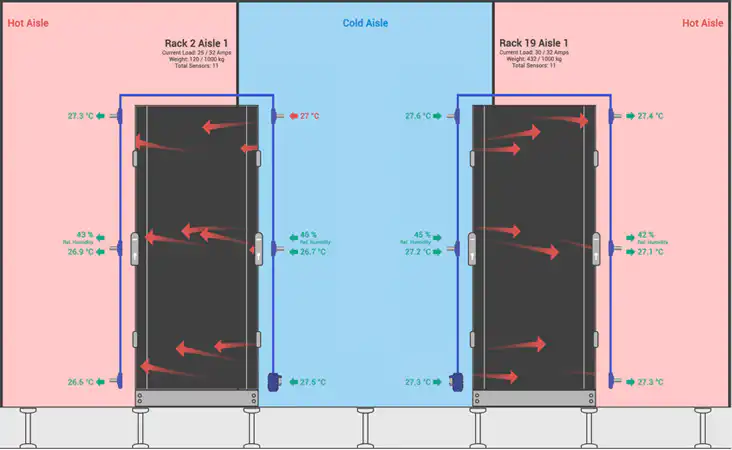
AKCP solutions can help IT and facilities teams monitor:
- Data center doors and access points
- Rack and cabinet access
- Temperature and humidity
- Water leaks and environmental conditions
- Power usage and UPS systems
- Battery status
- Motion, vibration, and tampering
- Sensor alarms and operational events
For example, AKCP Quicklime monitoring supports environmental, power, and security monitoring through a centralized interface. Its access-control integrations and RFID swing-handle locks can help organizations restrict and record access at the cabinet level.

This can support your evidence collection for Requirement 9 by helping demonstrate:
- Who accessed a controlled area
- When a door or cabinet was opened
- Whether an access event triggered an alert
- Whether physical events can be correlated with CCTV or other monitoring systems
- Whether access records are retained and reviewed
Environmental monitoring is not, by itself, an explicit PCI DSS Requirement 9 obligation. Nevertheless, temperature, humidity, water, smoke, and power monitoring are valuable operational controls because they help protect systems that support the cardholder data environment.
Learn more about AKCP data center monitoring and optimization and AKCP physical security sensors.
Common PCI DSS audit mistakes
The same issues appear repeatedly during PCI assessments:
- Incorrect scope : Teams overlook connected systems, backup environments, cloud services, or third-party access.
- Poor asset inventory : The organization cannot produce an accurate list of systems in the cardholder data environment.
- Unnecessary data storage : Cardholder data is found in logs, spreadsheets, backups, or test systems.
- Weak evidence management : Controls may exist, but screenshots, reports, tickets, approvals, and review records are missing.
- Shared administrator accounts : The business cannot prove individual accountability.
- Unreviewed vendor access : Service providers have broad or permanent access without proper monitoring.
- Incomplete vulnerability remediation : Findings are recorded but remain unresolved.
- Point-in-time compliance : The organization prepares only before the audit instead of operating controls throughout the year.
IT security audit checklist for PCI preparation
Use this checklist as a starting point:
- Define and document the cardholder data flow.
- Confirm the scope of the cardholder data environment.
- Maintain a current asset and software inventory.
- Review firewall, router, WAF, VPN, and segmentation rules.
- Remove default credentials and insecure services.
- Minimize stored cardholder data.
- Verify encryption and key-management controls.
- Review user accounts and privileged access.
- Confirm MFA coverage.
- Test patching and vulnerability-management processes.
- Review malware protection and endpoint alerts.
- Centralize and protect security logs.
- Test incident response procedures.
- Complete required scans and penetration tests.
- Secure data centers, racks, media, and network rooms.
- Review visitor logs and physical access records.
- Assess service providers and maintain responsibility agreements.
- Train employees and retain attendance evidence.
- Keep policies, procedures, tickets, reports, and approvals organized.
Final thoughts
A successful PCI DSS compliance audit is built on accurate scope, practical controls, continuous monitoring, and reliable evidence. The 12 requirements should not be treated as twelve separate projects. They work together to protect payment data across networks, applications, users, facilities, and third parties.
Start with scope. Reduce the amount of cardholder data you handle. Strengthen identity and access management. Test your controls regularly. Use physical security and monitoring tools to improve visibility across your data center and critical infrastructure.
For guidance on PCI DSS, IT security audits, cybersecurity, data center monitoring, career growth, or technology planning, contact Shelesh:
#PCI #PCIDSS #Cybersecurity #ITSecurityAudit #ComplianceAudit #DataCenterSecurity #NicholasBarrowclough #ServerRoom #datacenter #serverroom #monitoring #uptime #modbus #remotemanagement #datacenterPUE #datacenteroperations #datacenterhealth #ThermalOptimization #uptime
