







































Data centers consume electricity around the clock. Servers, storage systems, networking equipment, UPS systems, cooling units, lighting, and power distribution infrastructure all contribute to the final electricity bill.
For CIOs, CTOs, IT Heads, and Data Center Managers, the challenge is not simply reducing power consumption. The goal is to reduce waste while protecting uptime, equipment life, performance, and compliance.
This is where AKCP data center monitoring solutions can help.
AKCP combines environmental sensors, power monitoring, rack-level thermal visibility, and software analytics to show where electricity is being wasted. With accurate data, your team can optimize cooling, improve Power Usage Effectiveness (PUE), identify inefficient equipment, and make energy-saving decisions with less risk.
The connection between monitoring and energy savings
Monitoring does not save electricity by itself. It gives your operations team the information needed to make better decisions.
Without detailed data, many facilities use conservative settings. Cooling systems operate below the required temperature, fans run at unnecessarily high speeds, and unused equipment remains powered on. These actions may appear safe, but they create avoidable energy costs.
AKCP helps you answer important questions:
- Which racks are genuinely overheating?
- Where is conditioned air bypassing the IT equipment?
- Which areas are overcooled?
- How much power is consumed by IT equipment compared with cooling and other infrastructure?
- Are some servers, circuits, or UPS systems underutilized?
- Can cooling set points be increased safely?
- Is the facility’s PUE improving or getting worse?
This visibility supports measurable data center energy efficiency improvements.
1. Improve PUE with real-time data
Power Usage Effectiveness, or PUE, is one of the most widely used data center efficiency metrics.
The formula is:
PUE = Total Facility Energy ÷ IT Equipment Energy
For example, if a facility uses 1,000,000 kWh and IT equipment consumes 600,000 kWh:
PUE = 1,000,000 ÷ 600,000 = 1.67
A lower PUE generally indicates that less energy is being used by supporting infrastructure such as cooling, UPS systems, lighting, and power distribution.
AKCP power meters and monitoring software can help you track facility power and IT load over time. This allows your team to:
- Establish a reliable energy baseline
- Compare PUE across different periods
- Identify changes caused by cooling or load adjustments
- Measure the effect of containment and airflow improvements
- Detect abnormal increases in non-IT energy consumption
- Support sustainability and management reporting
AKCP’s PUE and DCiE calculator can also help you create an initial benchmark.
PUE should not be treated as the only performance measure. A lower number is not useful if it comes from overheating equipment, shutting down critical redundancy, or reducing availability. The best approach is to improve PUE while maintaining safe rack inlet temperatures, humidity, airflow, and uptime.
2. Reduce overcooling with rack-level thermal monitoring
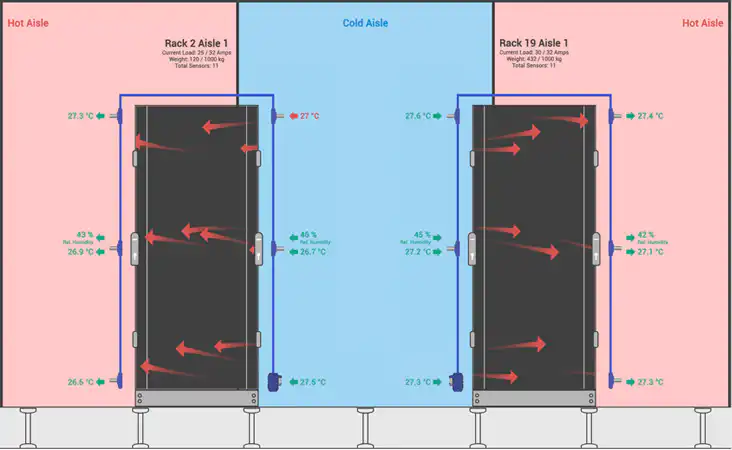
Many data centers cool the entire room based on average temperature readings. The problem is that room averages can hide hot spots and overcooled areas.
One rack may be operating at a safe temperature while another rack has a restricted airflow path or a high-density workload. At the same time, large parts of the room may be receiving more cooling than necessary.
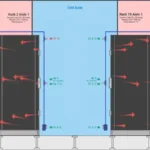
AKCP Thermal Map Sensors provide more detailed visibility at the rack level. Temperature measurements across the front and rear of a cabinet can help identify:
- Hot spots at the top, middle, or bottom of a rack
- Uneven airflow distribution
- Recirculation of hot exhaust air
- Blocked server intakes
- High differential temperature across equipment
- Cooling supplied to unused or low-density areas
This information allows operators to cool where it is needed instead of cooling the entire room excessively.
According to AKCP’s guidance, raising server inlet temperature by 1°C within the recommended operating range can reduce cooling costs by approximately 8–10%. However, changes should always be made gradually and supported by continuous monitoring. The objective is not to make the data center warmer without control. It is to operate closer to the safe efficiency limit.
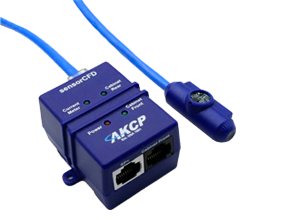
3. Use sensorCFD and AI to optimize airflow
Cooling energy is often wasted because of bypass airflow and hot-air recirculation.
Bypass airflow occurs when conditioned air travels back to the cooling unit without passing through IT equipment. Recirculation occurs when hot exhaust air returns to server intakes. Both conditions can make cooling systems work harder than necessary.
AKCP’s data center monitoring and optimization solution combines sensor data with sensorCFD and AI-driven analysis. This helps visualize airflow behavior and identify areas where cooling is being wasted.
With this information, a data center team may be able to:
- Adjust variable-speed fan settings
- Improve hot-aisle or cold-aisle containment
- Add or reposition blanking panels
- Correct cabinet airflow obstructions
- Increase cooling set points safely
- Redirect cooling toward high-density racks
- Reduce cooling in unpopulated areas
The result can be lower cooling demand, better thermal stability, and improved PUE.
4. Monitor power from the facility level to the rack
Cooling is only one part of the energy equation. To improve efficiency, you also need visibility into the electrical power chain.
AKCP supports power monitoring from facility and distribution levels down to individual cabinets and equipment circuits. Its solutions include power monitoring sensors, in-line power meters, and contactless current measurement options.
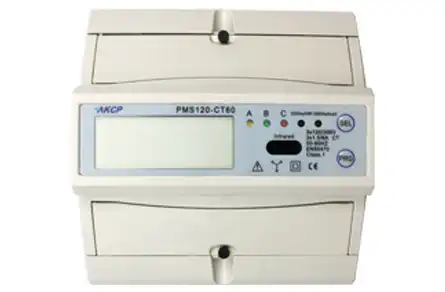
Power monitoring can help you identify:
- Underutilized circuits
- Phase imbalance
- Excessive standby consumption
- Unused or “zombie” equipment
- Unexpected load increases
- UPS and power distribution losses
- Available capacity for future IT deployments
Contactless monitoring is particularly useful for existing facilities because it can provide valuable information without requiring major cable changes or downtime. Data can be collected over time and analyzed to identify patterns rather than relying on occasional manual readings.
The AKCP Power Monitoring Sensor can also support live data collection through compatible AKCP monitoring platforms.
Can AKCP help achieve 20–30% energy savings?
A 20–30% reduction should not be presented as a guaranteed result for every data center. Actual savings depend on the facility’s age, current PUE, cooling design, IT load, electricity price, climate, equipment utilization, and operational discipline.
However, a facility with significant overcooling, poor airflow management, limited power visibility, or underutilized infrastructure may have meaningful savings opportunities. In such cases, a 20–30% reduction in avoidable cooling-related or operational energy waste may be a realistic improvement target after assessment and optimization.
For example, savings may come from a combination of:
- Raising cooling set points within safe limits
- Reducing unnecessary fan speed
- Correcting bypass airflow
- Improving containment
- Turning off unused equipment
- Consolidating workloads
- Balancing power loads
- Identifying inefficient cooling units
- Preventing the expansion of oversized infrastructure
The correct method is to establish a baseline, make controlled changes, and verify the results using sensor and power data.
A simple ROI example
Assume a data center spends ₹50 lakh per year on electricity.
If monitoring and optimization reduce avoidable energy consumption by 20%, the annual saving would be:
₹50 lakh × 20% = ₹10 lakh per year
If the total investment in sensors, installation, software, and professional support is ₹15 lakh, the simple payback period would be:
₹15 lakh ÷ ₹10 lakh = 1.5 years
This is only an example. A complete ROI calculation should also consider:
- Electricity tariff changes
- Installation and maintenance costs
- Avoided downtime
- Extended equipment life
- Deferred cooling or power upgrades
- Released rack and power capacity
- Reduced carbon emissions
- Improved audit and sustainability reporting
AKCP’s PUE optimization resources can help teams understand how efficiency improvements affect operating costs.
A practical implementation roadmap
Step 1: Establish your baseline
Collect current information about total facility load, IT load, cooling consumption, PUE, rack temperatures, humidity, and electricity costs.
Step 2: Start with critical racks and power paths
You do not always need to monitor every point on day one. Begin with high-density racks, critical rooms, older cooling zones, and major electrical distribution points.
Step 3: Install sensors without disrupting operations
Use appropriate temperature, humidity, thermal mapping, differential pressure, water leak, and power monitoring sensors. Make sure the solution can integrate with your existing BMS, DCIM, SNMP, or alerting systems.
Step 4: Make controlled adjustments
Change one factor at a time where possible. For example, adjust a cooling set point, improve containment, or reduce fan speed. Then monitor the effect on rack inlet temperatures, PUE, and power consumption.
Step 5: Automate alerts and reporting
Set alerts for thermal thresholds, power anomalies, humidity changes, and equipment conditions. Regular reports help management understand savings and support future investment decisions.
Final thoughts
AKCP helps data centers save electricity by converting invisible waste into measurable information.
Its sensors and software provide the visibility required to optimize PUE, reduce overcooling, improve airflow, monitor power usage, and protect critical IT equipment. When these capabilities are combined with disciplined operations, data center managers can target meaningful savings: potentially including 20–30% reductions in avoidable energy waste in facilities with substantial inefficiencies.
The best time to identify energy waste is before the next cooling upgrade, power expansion, or equipment failure.
Contact Shelesh for guidance on AKCP, data center energy efficiency, and technology planning
#AKCP #ServerRoom #datacenter #serverroom #monitoring #uptime #modbus #remotemanagement #datacenterPUE #datacenteroperations #datacenterhealth #ThermalOptimization #uptime
