














































Cloud has changed how businesses build, launch, and scale technology. But it has also created a new challenge: infrastructure costs can grow faster than revenue.
Unused virtual machines, oversized databases, inefficient storage, uncontrolled data transfer, and forgotten development environments can quietly increase your monthly bill. For CIOs, CTOs, IT Heads, and CFOs, cloud cost optimization is no longer only a technical task. It is a business priority.
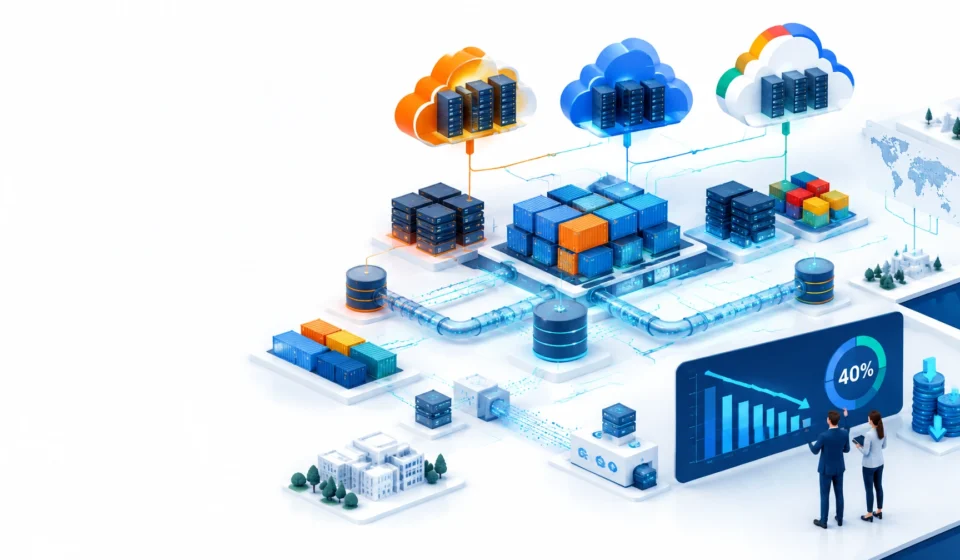
A well-managed optimization program can reduce waste significantly. In some environments, organizations may reduce cloud spending by up to 40% through a combination of right-sizing, automation, storage management, commitment discounts, and FinOps practices. The actual result depends on the current environment, workload patterns, contracts, and governance maturity.
This guide explains five practical steps for optimizing infrastructure across AWS, Microsoft Azure, and Google Cloud Platform (GCP).
What Is Cloud Infrastructure Optimization?
Cloud infrastructure optimization means improving the cost, performance, security, reliability, and sustainability of your cloud environment.
The objective is not simply to spend less. An aggressive cost reduction that damages application performance or availability can create larger business losses. The objective is to pay for the right resources, at the right time, with the right level of performance.
A strong optimization program should answer questions such as:
- Which resources are over-provisioned?
- Which workloads are idle or underused?
- Can non-production systems be shut down outside business hours?
- Which data requires premium storage?
- Which workloads are stable enough for long-term commitments?
- Who owns each cloud cost?
- How do cloud costs compare with on-premises power, cooling, and infrastructure costs?
Step 1: Right-Size Your Compute and Database Resources
Right-sizing is often the fastest way to identify cloud savings.
Many organizations select large virtual machines during deployment because they want to avoid performance problems. Over time, usage changes, but the original infrastructure remains unchanged. A virtual machine that once required eight CPUs may now use only two. A database provisioned for peak growth may remain mostly idle.
Review resource utilization over a meaningful period, preferably at least 14 days and longer for workloads with seasonal demand. Examine:
- CPU utilization
- Memory usage
- Network traffic
- Disk I/O
- Database connections
- Request volume
- Application response time
- Business-critical peak periods
AWS customers can use tools such as AWS Cost Explorer and AWS Compute Optimizer to identify potential recommendations. Azure provides Azure Advisor and Cost Management capabilities, while GCP provides Recommender and Cloud Monitoring.
Do not focus only on virtual machines. Review databases, Kubernetes nodes, load balancers, NAT gateways, disks, snapshots, public IP addresses, and managed services.
Also look for abandoned resources:
- Unattached storage volumes
- Old snapshots
- Idle load balancers
- Unused elastic IP addresses
- Forgotten test environments
- Duplicate development accounts
- Stale machine images
Before making production changes, test the new configuration. Record performance and cost before and after the change. This evidence helps build confidence with application owners and finance teams.

Step 2: Use Autoscaling and Automation
Paying for maximum capacity throughout the day is inefficient when demand changes.
Autoscaling allows infrastructure to expand during high demand and reduce capacity during quiet periods. It is particularly valuable for web applications, APIs, container platforms, batch processing, and customer-facing services.
Examples include:
- Amazon EC2 Auto Scaling
- Azure Virtual Machine Scale Sets
- Google Compute Engine managed instance groups
- Kubernetes horizontal pod autoscaling
- Serverless services such as AWS Lambda, Azure Functions, and Google Cloud Run
Scaling should not rely only on CPU utilization. Depending on the application, better signals may include:
- HTTP requests per second
- Queue depth
- Active users
- Database connections
- Response latency
- Transaction volume
- Custom application metrics
For development and testing environments, create schedules to stop systems overnight, during weekends, and on public holidays. A non-production environment that runs continuously but is used only eight hours per day may create unnecessary cost for most of its operating time.
Spot or preemptible capacity can also reduce costs for fault-tolerant workloads such as:
- Batch jobs
- Data processing
- Continuous integration runners
- Rendering
- Analytics
- Distributed testing
Do not use interruptible capacity for every workload. Critical databases and customer-facing services require appropriate availability and recovery planning.
Automation is essential. Use policies, infrastructure as code, and event-driven workflows to prevent waste from returning after an optimization project is complete.
Step 3: Apply Storage Tiering and Lifecycle Policies
Storage costs are often overlooked because they grow gradually. Logs, backups, media files, database snapshots, and application data can accumulate for years.
The solution is to match the storage tier to the value and access frequency of the data.
A simple model is:
- Hot storage: Frequently accessed, performance-sensitive data
- Warm or cool storage: Data accessed occasionally
- Cold or archive storage: Long-term retention and compliance data
AWS S3 storage classes, Azure Blob access tiers, and Google Cloud Storage classes allow organizations to manage cost according to access patterns.
Lifecycle policies can automatically:
- Move older objects to lower-cost tiers
- Delete temporary files after a defined period
- Expire incomplete uploads
- Archive historical logs
- Remove old snapshots
- Apply different retention periods to different data types
Before shortening retention, confirm regulatory, legal, contractual, and security requirements. Financial services, healthcare, insurance, and public-sector organizations may need to retain records for specific periods.
Review backup policies as well. Multiple teams may be backing up the same data independently. A centralized policy can reduce duplication while preserving recovery objectives.
Storage performance should also be right-sized. Premium disks and high IOPS configurations are useful when required, but expensive when assigned by default. Review throughput and IOPS requirements before moving workloads to more cost-effective storage options.

Step 4: Use Reserved Instances, Savings Plans, and Committed Use Discounts
Once waste has been removed and workloads have been right-sized, review long-term pricing commitments.
Cloud providers offer discounts when customers commit to consistent usage:
- AWS Reserved Instances and Savings Plans
- Azure Reserved VM Instances and other reservations
- GCP Committed Use Discounts
These options can be highly effective for stable workloads such as:
- Core application servers
- Production databases
- Long-running Kubernetes clusters
- Enterprise ERP systems
- Always-on monitoring platforms
- Predictable analytics environments
Do not purchase commitments simply because a discount is available. Analyze six to twelve months of usage data first. Identify the baseline capacity that is likely to remain stable.
Keep variable, experimental, seasonal, and rapidly changing workloads on flexible pricing models. A balanced strategy may combine:
- Commitments for predictable baseline usage
- On-demand capacity for changing requirements
- Spot or preemptible capacity for fault-tolerant workloads
Commitments should be reviewed regularly. Business growth, migrations, mergers, application modernization, and workload retirement can change the required capacity.
Step 5: Establish FinOps and Connect Cloud Monitoring with DCIM
Cloud optimization cannot be a one-time exercise. New resources are created every day, and costs can rise again without clear ownership and governance.
FinOps brings finance, engineering, operations, procurement, and business teams together to manage technology spending. It creates shared accountability for cloud value.
Begin with basic controls:
- Apply consistent tags for application, team, environment, and cost center
- Set budgets and alerts
- Assign owners to every production workload
- Monitor unexpected usage spikes
- Review unallocated costs
- Create monthly cost and performance reviews
- Track savings against business outcomes
Native tools such as AWS Cost Explorer, Azure Cost Management, and GCP Billing reports can provide useful visibility. The important point is to turn reports into action. Every review should identify decisions, owners, and deadlines.
For organizations operating hybrid infrastructure, cloud monitoring should be considered alongside data center monitoring.
AKCP and DCIM solutions can help monitor:
- Rack temperature
- Humidity
- Power usage
- Battery conditions
- Water leakage
- Door access
- Environmental alarms
- Capacity and physical infrastructure health
This information helps IT leaders compare the true cost of on-premises infrastructure with cloud alternatives. For example, a server may appear inexpensive from a hardware perspective, but its electricity, cooling, rack capacity, maintenance, and operational risk also matter.

A physical hot spot or power issue can also affect application reliability. Monitoring data center conditions helps prevent outages that could lead to emergency cloud migrations, lost productivity, or customer impact.
How Much Can Your Organization Save?
A 40% reduction is possible in some environments, but it should be treated as a target rather than a guarantee.
The largest opportunities are usually found where organizations have:
- Large numbers of idle resources
- Oversized compute instances
- Uncontrolled storage growth
- No non-production shutdown schedules
- Low commitment coverage for stable workloads
- Poor tagging and cost ownership
- Unmonitored hybrid infrastructure
A practical approach is to start with a 30-day assessment, followed by a 60-day implementation and governance phase.
Final Checklist for CIOs and CTOs
Ask your team these five questions:
- Have we reviewed the actual utilization of our compute and database resources?
- Are applications scaling automatically with demand?
- Are storage classes and retention policies aligned with business value?
- Have we analyzed stable usage before purchasing cloud commitments?
- Can we connect cloud cost data with data center power, cooling, and capacity data?
Cloud infrastructure optimization is both a technical and financial discipline. When engineering, finance, security, and leadership work together, organizations can reduce waste while improving reliability and decision-making.
If you need help with cloud infrastructure optimization, AI consulting services, hybrid infrastructure, AKCP/DCIM monitoring, or a technology career and Gulf job-planning discussion, contact Shelesh for guidance.
Further Reading
