













































Let’s be real for a second. A few years ago, the promise of the cloud was simple: "Pay only for what you use, and save a fortune on hardware." It sounded like a dream for every CFO and CIO.
But fast forward to 2026, and many leadership teams are waking up to a different reality. The "pay-as-you-go" model has turned into a "pay-for-everything-you-forgot-to-turn-off" nightmare. If your AWS or Azure bill looks like a phone number from another country, you aren't alone. Between "zombie" resources, over-provisioned instances, and the hidden costs of data egress, the cloud can become a financial black hole if you aren’t careful.
As an IT Consultant, I’ve seen organizations of all sizes: from startups to massive banks: struggle with this. But here’s the good news: optimizing your cloud spend isn't just about cutting costs; it’s about maximizing value.
In this guide, we’re going to look at how you can bridge the gap between cloud myths and fiscal reality, specifically for AWS and Azure environments.
Why the Bill Spirals: The Reality Check
Before we jump into the fixes, we have to understand the problem. Why do cloud costs spiral? Usually, it’s a combination of "Shadow IT" (teams spinning up resources without oversight) and a lack of a FinOps culture.
In the old days of on-premise hardware, you had a physical box. If you didn't use it, it sat there, but it didn't cost you more money every hour. In the cloud, every gigabyte of storage and every minute of compute is a meter running.
Common culprits include:
- Zombie Resources: Idle load balancers or unattached storage volumes.
- Over-provisioning: Using a "Large" instance when a "Small" would do.
- Lack of Tagging: If you don't know who owns a resource, you can't hold them accountable for the cost.

Mastering the AWS Bill: Beyond the Basics
AWS is a beast, but it’s a beast that can be tamed. For CIOs looking at an AWS bill that’s growing faster than their revenue, there are three primary levers to pull:
1. Savings Plans & Reserved Instances (RIs)
If you have workloads that run 24/7 (like your core databases or production web servers), paying "On-Demand" prices is essentially throwing money away. AWS Savings Plans can offer up to 72% savings compared to On-Demand prices. The key is committing to a consistent amount of usage (measured in $/hour) for a 1 or 3-year term.
2. AWS Compute Optimizer
Leverage the power of AI. AWS Compute Optimizer uses machine learning to analyze your historical usage and recommend the optimal AWS resources for your workloads. It doesn't just tell you to "downsize"; it might suggest moving to a different instance family (like moving from Intel-based to Graviton-based instances) which offers better price-performance.
3. S3 Lifecycle Policies
Storage is often the "hidden" cost. Are you keeping logs from three years ago in S3 Standard storage? Use Lifecycle policies to automatically move that data to S3 Glacier Deep Archive. It’s the difference between paying dollars and paying cents.
Azure Optimization: Leveraging the Microsoft Ecosystem
Azure has its own unique set of advantages, especially for organizations already deep in the Microsoft stack.
1. Azure Hybrid Benefit
This is a big one for CFOs. If you already have Windows Server or SQL Server licenses with Software Assurance, you can use them in Azure. This can reduce your cloud costs by up to 40% compared to standard pay-as-you-go rates. It’s essentially "bringing your own license" to the party.
2. Azure Advisor
Think of Azure Advisor as your free, built-in consultant. It scans your environment and gives you a "Cost" tab full of actionable advice. It will flag underutilized virtual machines and suggest where you should buy Reserved Instances.
3. Spot Virtual Machines
For non-critical workloads, batch processing, or dev/test environments, Azure Spot VMs allow you to use Microsoft’s unused capacity at a massive discount (up to 90%). The catch? Microsoft can take them back with 30 seconds' notice if they need the capacity. For the right workload, this is a game-changer.

The Physical Layer: Don't Forget the Data Center
While we talk about "the cloud," it’s important to remember that the cloud is just someone else's computer. If you are running a Hybrid Cloud model or managing your own Data Center, physical efficiency is just as important as software optimization.
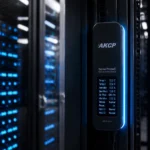
This is where AKCP solutions come in. At IT Consultant, we guide CIOs on why AKCP is a non-negotiable purchase before even thinking about new IT devices.
Why? Because:
- AKCP Battery Monitoring: Ensures your UPS doesn't fail when you need it most, preventing catastrophic downtime.
- AKCP Solar Solutions: Helps you save electricity and move toward a greener, more sustainable IT infrastructure.
- Risk Mitigation: If you aren't monitoring your physical environment (temp, humidity, power), you are risking the life of your expensive IT infrastructure.
A well-monitored data center is an efficient one. Saving electricity in your physical racks is just as impactful on your bottom line as rightsizing an EC2 instance.

Compliance and Audits: The Secret to Long-Term ROI
You might wonder what a PCI Audit, RBI Audit, or UAE Central Bank Audit has to do with cloud costs. The answer is: Everything.
Non-compliance is the most expensive mistake a CIO can make. A single failed audit can lead to massive fines, reputational damage, and forced emergency migrations that cost ten times what a planned project would.
By building your cloud architecture with compliance in mind (using tools like AWS Artifact or Azure Policy), you ensure that your "Reality" doesn't include a multi-million dollar fine from SEBI or the Insurance Regulatory and Development Authority of India.
At IT Consultant, we specialize in:
- Network Audits: Ensuring your structured cabling and networking are up to the task.
- Cyber Security Audits: Protecting your cloud and on-prem assets from the latest threats.
- Data Center Audits: A holistic look at your physical and digital health.

Your 12-Month Roadmap to Cloud Sanity
If you’re feeling overwhelmed, don't worry. You don't have to fix everything today. Here is a simple plan:
- Months 1-2: Visibility. Implement tagging across all AWS and Azure accounts. If you can't see it, you can't save it.
- Months 3-4: The Low-Hanging Fruit. Use AWS Compute Optimizer and Azure Advisor to delete "zombie" resources and downsize obvious over-provisions.
- Months 5-8: Commitments. Once you know your steady-state usage, buy Savings Plans or Reserved Instances.
- Months 9-12: Automation & Culture. Implement "Auto-shutdown" for dev environments and start a monthly FinOps review meeting with your CFO.
Need Guidance? Let's Connect.
Optimizing your technology stack: from AI implementation and DevOps to physical data center security and global compliance: is a journey. Whether you are planning a career move to the Gulf countries, looking to scale your infrastructure in India, or need a roadmap for your next Qatar or UAE Central Bank Audit, we are here to help.
Don’t let your cloud spend spiral out of control. Let’s bring your cloud back to reality.
